
The designer's editable source
An INDD file opens in Adobe InDesign. Polyframe does not open it, and the translator does not need to receive it.
For freelance translators and small translation agencies
A client sends an InDesign job. You do not own InDesign, and their spreadsheet has stripped away the context. Ask for IDML instead. Translate it in Polyframe and return a complete file their designer can open.
No Adobe subscription · no enterprise CAT rollout · manual translation and optional AI
You probably know this kind of job
You are a freelance translator. A regular client asks for a Polish version of an instruction manual designed in Adobe InDesign. You know the subject, you already have approved wording from an earlier job and the deadline fits your calendar. Then the source arrives as an INDD file.
You do not own InDesign, and buying an Adobe subscription for one project makes little sense. The client exports the text to Excel instead. Hundreds of rows arrive without enough context: “Warning”, “Before starting”, a model number, half a table and a sentence that may be a picture caption. You begin writing an email declining the job.
A large CAT system might import IDML. You may not have access to one, need its project-management machinery or want another expensive subscription. Your problem is much smaller: understand the manual, translate it properly and give the client a file their designer can use.
Three file names. That is all you need to know.
You do not need to learn InDesign. You only need the right file from the designer.
An INDD file opens in Adobe InDesign. Polyframe does not open it, and the translator does not need to receive it.
The designer exports IDML from InDesign. It carries the document's text and structure into Polyframe and can return to InDesign after translation.
Polyframe organises IDML text into segments for manual editing, memory matches, terminology rules, review and optional AI.
It runs on your computer
Polyframe runs on macOS and Windows. The IDML, target languages, statuses, settings and reusable translation memory are saved locally in a .polyframe project. You can work manually without sending the client's text anywhere, and local Ollama translation can also stay offline.
Online AI is your choice. Connect your own provider, such as OpenAI, Claude or Gemini, use Polyframe AI or leave every AI control alone. Our IDML translation app remains useful when the entire job is translated by a human.
Manual when you want it. AI when it helps.
Polyframe does not force AI on you and does not tie you to one provider.
In our app, you can write the target text directly in the grid, use statuses to track progress and keep sensitive work local.
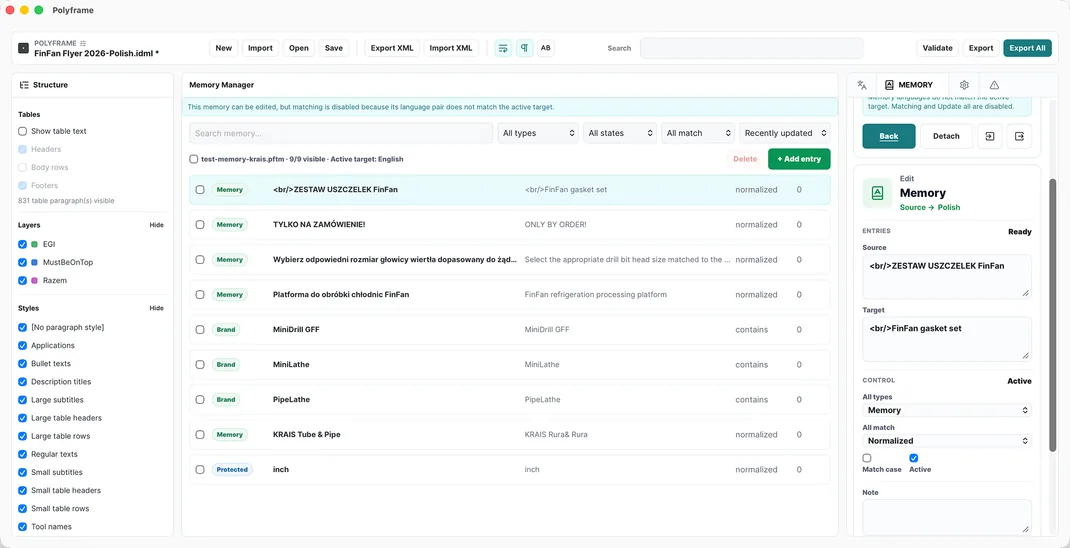
Our translation app lets you attach a .pftm memory, propagate repetitions and apply preferred or protected terminology.
The Polyframe App can use your existing OpenAI, Claude, Gemini or compatible provider account when the project permits it.
Inside Polyframe, you can run Ollama locally or activate Polyframe AI when you want a prepared allowance in the app.
What actually happens to the file
Polyframe gives the IDML a clear route between translator and designer. Everybody knows which file they receive, what they do with it and what comes back.
01 · Client
The original manual.indd stays with the designer. The IDML becomes the working exchange file for translation.
02 · Polyframe
In the app, set the target language, attach the memory from the earlier project and protect model names before translating.
03 · Polyframe review
Use the app to search, filter and sort the grid, then review statuses, length signals, protected terms and warnings before export.
04 · Delivery
Our IDML translation app exports the complete Polish file. The designer opens it, corrects pages affected by longer text and creates the final PDF.
What Polyframe actually helps with
Our IDML translation app replaces hundreds of unexplained Excel rows with the tools needed to finish this particular job.
The Polyframe App presents paragraph order and table content in a translation grid, so you do not have to guess what an Excel cell represents.
In the desktop app, you can find a phrase, isolate unfinished work and distinguish new, translated and reviewed segments.
Our app for translating IDML can propagate an approved translation across recurring warnings, headings or product descriptions where appropriate.
Store approved source and target pairs in a portable Polyframe translation memory instead of losing them in an old delivery sheet.
Polyframe, our focused InDesign companion app, lets you add preferred translations, brand entries and do-not-translate rules for names, codes and wording that must stay consistent.
The desktop app lets you reverse accidental project actions and warns you before you leave work unsaved.
What Polyframe is
Large platforms coordinate vendors, automation, permissions and reports. Polyframe does not pretend to replace all of that. It translates InDesign IDML files and returns them in the same working format.
For a freelancer or small agency, the Polyframe App can be just the right amount of software: segments, memory, terminology, checks, manual work and optional AI. No platform built for a localisation department you do not have.
And this is how the job can end
The designer opens the returned file in InDesign, sees that the Polish safety heading needs another line and adjusts two table rows. Those are visual decisions, so they remain with the person responsible for the layout.
A month later, the client asks about a parts catalogue. Your Polyframe memory already contains the approved terminology from the manual. This time you do not ask whether the job is possible. You ask for the IDML and start the estimate.
Start with the real document, not a sales call
The same desktop application supports manual work, your own AI providers and local Ollama at every stage.
01 · DOWNLOAD FIRST
No card, key or time limit. Use every feature and export complete IDML files with visible Trial markings.
02 · CLEAN EXPORT
Remove Trial markings from exported IDML while keeping manual translation, connections to your own AI provider and local Ollama.
Buy Polyframe™03 · OPTIONAL MANAGED AI
Add a monthly word allowance when you want ready-to-use AI inside the app without configuring a provider.
See AI plans →Plain answers before you download
Yes, if the designer exports the document as IDML. Polyframe opens IDML on macOS and Windows; it does not require an Adobe InDesign subscription.
No. Ask the client or designer to export the INDD source as IDML. The original layout remains with them.
No. Polyframe includes a translation grid, statuses, repetitions, memory, terminology tools and checks for IDML work. It is not a full enterprise CAT/TMS, but many individual IDML jobs simply do not need one.
Yes. AI is optional. The Polyframe App lets you write and review every target segment manually while keeping the project local.
Yes. Polyframe can connect to your own provider, such as OpenAI, Claude or Gemini. You can also use local Ollama or optional managed Polyframe AI.
Polyframe exports a complete translated IDML. The client's designer opens it in InDesign for the final line-break, overflow and visual checks before producing the PDF.
Try it on a real IDML file
Polyframe Trial has no card, key or time limit and includes the full workflow with marked IDML export. The one-time App Licence removes Trial markings and keeps manual work, your own AI providers and local Ollama available.