
The working InDesign document
Your original layout remains in Adobe InDesign. Polyframe does not open or alter the INDD file.
For freelance designers and small DTP studios
The catalogue is ready. Then the client asks for German, French and Czech. This should not mean three days of matching spreadsheet rows to text frames. The translator can work on the IDML in Polyframe while you keep the original layout in InDesign.
Desktop app for macOS and Windows · manual translation or optional AI · no enterprise CAT rollout
You probably know this kind of job
You run a small DTP studio. The 96-page product catalogue is finished, the client has approved the English PDF and the printer is waiting. Then an email arrives: the same catalogue is needed in German, French and Czech for next week's trade fair.
The German translation comes back as a spreadsheet with 684 rows. A headline sits beside a table cell, a picture caption and a product specification. You copy, paste and search for the correct frame. Halfway through the document, another file arrives called catalogue_DE_final_corrected_2.xlsx. Nobody can tell you immediately which lines changed.
This is not design work. You have simply become the person who carries every sentence from one file to another. A large CAT platform could organise it, of course. But buying and introducing one for a few multilingual catalogues a year? That is a lot of system for a very ordinary job.
Three file names. That is all you need to know.
They sound technical. In practice, each one has a very simple job.
Your original layout remains in Adobe InDesign. Polyframe does not open or alter the INDD file.
IDML carries the document structure, paragraph styles, tables and inline formatting needed to move the language work outside the layout.
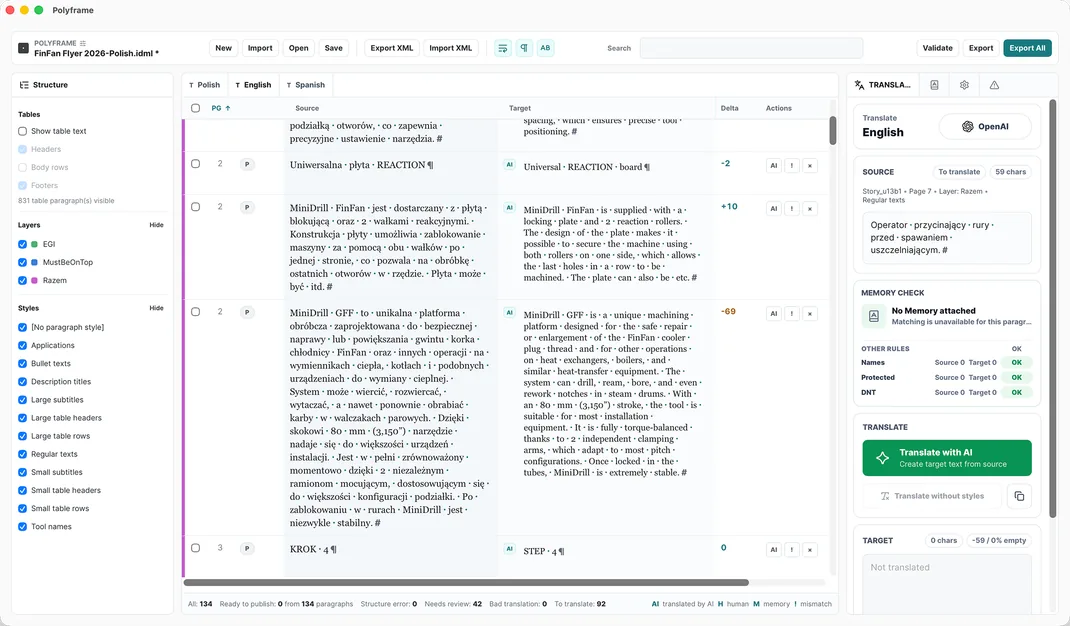
Polyframe opens the IDML on macOS or Windows, presents its text as organised segments and exports a complete translated IDML when the language is ready.
It runs on your computer
Download the application for macOS or Windows and keep each job as a local .polyframe project. The source files, target languages, statuses, translation memory and settings stay on the computer. Manual work can remain offline, as can translation through a local Ollama model.
If the translator wants online AI, they can use their own OpenAI, Claude or Gemini key, or choose Polyframe AI. If they do not want AI, they simply ignore it. Polyframe still works when every sentence is translated by a person.
Manual when you want it. AI when it helps.
The Polyframe App gives the translator these choices without asking the studio to buy a large translation platform first.
In our app, the translator can edit every target segment, review it and mark it with a clear status. AI is never required.
The Polyframe App can attach a translation memory and apply glossary or protected-term rules to repeated catalogue wording.
Our IDML translation app can connect to your own AI provider, such as OpenAI, Claude or Gemini, so the studio or translator keeps control of the selected model and its cost.
Inside the app, the translator can run Ollama locally or choose Polyframe AI when a ready-to-use allowance is more convenient.
What actually happens to the file
Here is the whole exchange through InDesign and Polyframe, with actual file names and no vague talk about “final production”.
01 · InDesign
Keep catalogue.indd as the source. Export catalogue.idml and send the exchange file to the translator.
02 · Polyframe
In the app, the translator works through headings, table text, descriptions and captions without needing an InDesign seat.
03 · Polyframe export
The app can export catalogue-DE.idml, catalogue-FR.idml and catalogue-CZ.idml from the completed project instead of returning three loose spreadsheets.
04 · InDesign
Adjust the German headline that no longer fits on page 17, the French table on page 43 and the Czech caption on page 81, then export the PDFs.
What Polyframe actually helps with
Polyframe is our small, focused InDesign companion app, not an InDesign replacement. It deals with the text problems that waste time during multilingual DTP.
The app keeps paragraph styles, tables and inline formatting connected while the wording changes, so it returns a working IDML rather than a list of strings.
In the Polyframe App, the German, French and Czech versions can stay beside the same source instead of requiring a new handoff for every language.
Polyframe shows length signals while the translator is working, so a long headline can be noticed before it becomes a surprise in the next InDesign proof.
Our IDML translation app validates inline tags and shows project warnings before export, drawing attention to formatted content that needs checking.
Our desktop app gives you search, filters and statuses for a long catalogue. You can even change small visual details, including button colours, so Polyframe feels like your own tool.
Polyframe, our focused InDesign companion app, works with exported IDML, so the designer keeps the editable INDD layout in the studio throughout the language work.
What Polyframe is
Polyframe does not coordinate hundreds of vendors, automated pipelines and corporate reports. It is for a much more immediate situation: there is an InDesign document on your desk and somebody has to translate it.
That is often enough for a two-person studio, a freelancer working with a trusted translator or an agency producing a few multilingual brochures each year. Solve the IDML job without adding an expensive platform that nobody wants to administer.
And this is how the job can end
The translated IDML files still need a designer. German words may be longer, a French legal note may need another line and a table can still overflow. Polyframe never claims that those visual decisions disappear.
The important difference is where your work begins. Our app exports a complete language IDML, so you fix the pages that need a designer and export the PDF. You do not rebuild the catalogue from 684 spreadsheet rows first.
Start with the real document, not a sales call
The same desktop application supports manual work, your own AI providers and local Ollama at every stage.
01 · DOWNLOAD FIRST
No card, key or time limit. Use every feature and export complete IDML files with visible Trial markings.
02 · CLEAN EXPORT
Remove Trial markings from exported IDML while keeping manual translation, connections to your own AI provider and local Ollama.
Buy Polyframe™03 · OPTIONAL MANAGED AI
Add a monthly word allowance when you want ready-to-use AI inside the app without configuring a provider.
See AI plans →Plain answers before you download
No. The designer exports an IDML from InDesign, and the translator opens that IDML in the Polyframe desktop app on macOS or Windows.
No. INDD remains the designer's working source. Export it as IDML before opening the document in Polyframe.
Polyframe keeps the IDML structure, styles, tables and supported inline formatting connected to the text. Translation changes text length, so a designer must still check line breaks, overflows and appearance in InDesign.
No, not for this workflow. Use a CAT platform when a client requires one. For many small-studio jobs, Polyframe already gives you the memory, glossary, status and IDML tools you need.
No. Every segment can be translated and reviewed manually. Connecting your own AI provider, using local Ollama or choosing Polyframe AI are all optional.
Polyframe exports a complete IDML for each target language, ready to open in InDesign for the final visual and overflow checks before creating the PDF.
Try it on a real IDML file
Polyframe Trial includes the complete desktop workflow with no card, key or time limit. Trial exports contain visible markings; the one-time App Licence unlocks clean IDML export and keeps connections to your own AI providers and local Ollama available.