
The original design file
The designer keeps and edits the INDD in Adobe InDesign. Polyframe does not open this source file.
For small marketing teams and agencies
The claim changes. Legal adds a sentence. Five markets send comments in five different files. The designer should not become the translation inbox. Polyframe gives your team one local place to settle the words before asking for another PDF.
Desktop app for macOS and Windows · several languages in one project · manual review and optional AI
You probably know this kind of job
You manage marketing in a small company. The agency has designed a product brochure, a flyer and two posters for a trade fair in Munich. Five language versions must reach the printer, and the English PDF is almost approved.
Then headquarters changes the main claim. Germany says the translation sounds unnatural, France proposes different product wording and legal adds a sentence in small print. Comments return in email, annotated PDFs and two spreadsheets. The designer exports another proof every time somebody changes three words.
Soon the folder contains brochure_DE_final.pdf, brochure_DE_final_2.pdf and brochure_DE_final_after_comments_NEW.pdf. You have no localisation manager and no CAT platform. You need to finish a brochure, a flyer and two posters. You do not need an enterprise software project before the exhibition stand is built.
Three file names. That is all you need to know.
The agency keeps the layout. Your team works on an exchange copy of the words.
The designer keeps and edits the INDD in Adobe InDesign. Polyframe does not open this source file.
IDML carries brochure, flyer or poster text in a form Polyframe can open and later return to InDesign.
Marketing can organise target languages, statuses, approved claims and corrections without editing the visual layout.
It runs on your computer
Polyframe runs on macOS and Windows. The source IDML, language versions, statuses, settings and reusable wording are stored in a local .polyframe project. Manual editing can remain offline, and a local Ollama model offers an offline AI route when appropriate.
Online translation is optional. Connect your own provider, such as OpenAI, Claude or Gemini, choose Polyframe AI or write every line manually. Polyframe does not hold meetings and does not approve claims. Your team still makes the decisions. The app gives those decisions one place to live.
Manual when you want it. AI when it helps.
The Polyframe App lets you use the method that fits the sentence. There is no reason to force the same automation on a slogan, a table and a legal note.
In our app, enter approved claims, legal notes and product descriptions directly, then mark their state clearly.
Our translation app keeps recurring descriptions, claims and terminology in memory instead of making you copy them from last year's brochure.
The Polyframe App can connect to your own OpenAI, Claude, Gemini or compatible account for selected drafts when company policy allows online processing.
Inside our app, you can run Ollama locally or use Polyframe AI for prepared assistance while keeping human approval central.
What actually happens to the file
Polyframe keeps the language work between the agency's IDML export and its final DTP check. Marketing, translation and design remain different jobs.
01 · Agency
The original INDD stays with the designer. Marketing receives a working exchange file for the language content.
02 · Polyframe project
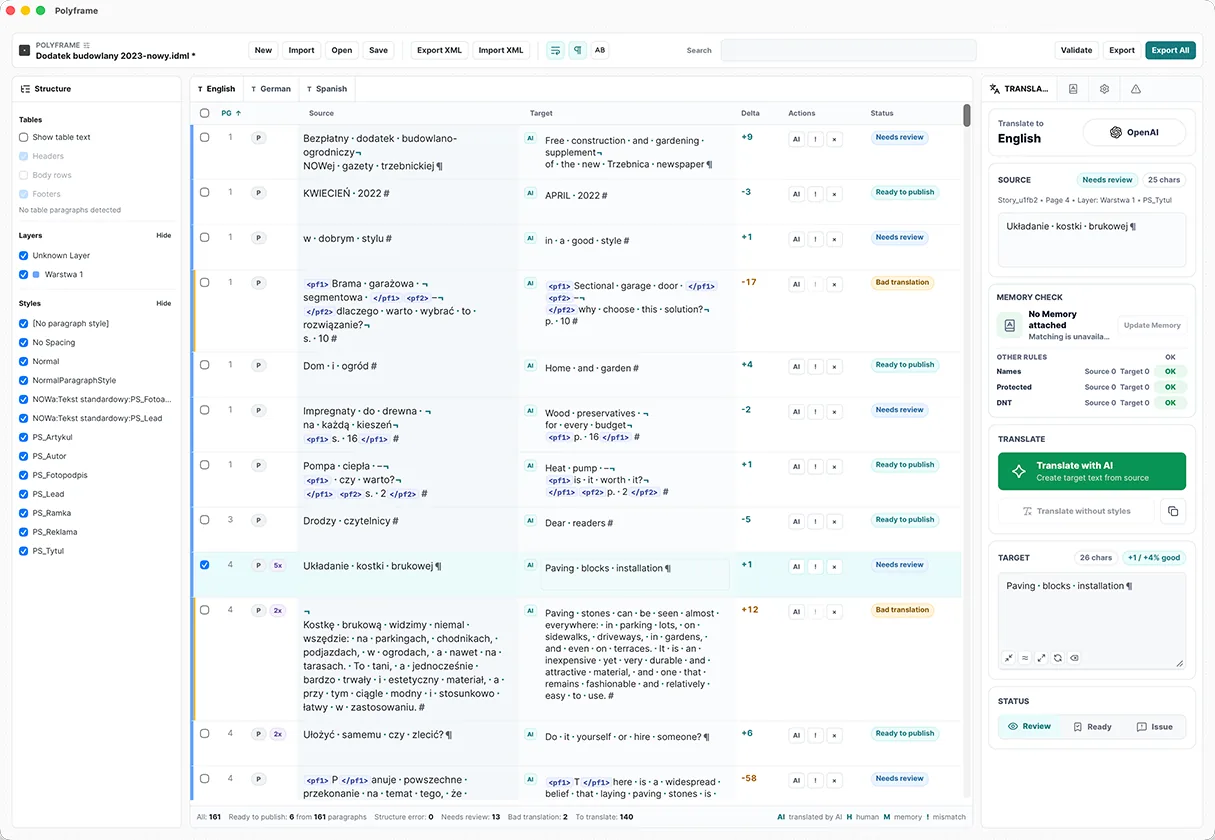
In the app, keep German, French and the other markets beside one source, with statuses showing what is still open.
03 · Polyframe approval
Use the app to protect product names, reuse approved claims and replace draft text with the final decision.
04 · Polyframe export
Our IDML translation app creates brochure-DE.idml and the other finished language files for the agency instead of another set of correction spreadsheets.
05 · DTP
The agency adjusts the German headline, the French legal note and any overflowing frames, then exports print-ready PDFs.
What Polyframe actually helps with
Polyframe is our small, focused InDesign companion app. It gives a small team one clear place for what is approved, what repeats and what must never change.
In our app, you can add German, French and other target languages beside the same source instead of building a new folder and correction process for every market.
Polyframe shows which segments are new, translated or reviewed, so nobody has to guess from a file name containing “final”.
Our translation app saves approved language in memory, so recurring product copy does not restart from an old PDF.
Polyframe, our focused InDesign companion app, can protect product names, campaign phrases and selected identifiers wherever the language strategy says they must remain unchanged.
The app can export and import project text through an Excel-compatible XML workflow when somebody must contribute outside Polyframe.
Our desktop app lets you reverse accidental project changes and warns you before you leave approved work unsaved.
What Polyframe is
Large localisation operations need vendor management, automation, permissions and reports. Polyframe is not that system. It is for the team staring at an InDesign brochure, catalogue, flyer or poster that must exist in several languages.
With Polyframe between translation and DTP, marketing can take responsibility for the words without taking over the layout. The designer can stay a designer instead of becoming the translation project manager.
And this is how the job can end
Polyframe does not collect every comment automatically and it cannot approve legal language. Marketing still talks to local markets, product owners and legal. The difference is simple: the agreed wording goes into one project before the file returns to DTP.
Our app exports the completed language IDML files. The designer opens them, makes the necessary visual adjustments and exports the PDFs. The materials arrive before the stand is assembled, and the next Polyframe project can reuse the wording already approved this time.
Start with the real document, not a sales call
The same desktop application supports manual work, your own AI providers and local Ollama at every stage.
01 · DOWNLOAD FIRST
No card, key or time limit. Use every feature and export complete IDML files with visible Trial markings.
02 · CLEAN EXPORT
Remove Trial markings from exported IDML while keeping manual translation, connections to your own AI provider and local Ollama.
Buy Polyframe™03 · OPTIONAL MANAGED AI
Add a monthly word allowance when you want ready-to-use AI inside the app without configuring a provider.
See AI plans →Plain answers before you download
No. Ask the designer or agency to export IDML. Marketing works with the text in Polyframe, while the designer keeps the INDD and final visual responsibility.
Yes. Our desktop app keeps several target languages beside one source and exports a separate IDML for each completed language.
No. Polyframe gives you statuses, memory, terminology tools and an IDML workflow. It does not replace a full CAT/TMS when a company really needs to manage vendors and localisation across the whole organisation.
Polyframe includes an Excel-compatible XML round trip for exchanging project text when part of the process must happen outside the app.
Yes. Polyframe lets you create protected and terminology entries, then review the relevant segments before exporting the language IDML.
No. In Polyframe, every correction and translation can be entered manually. Connecting your own AI provider, using local Ollama or choosing Polyframe AI are optional.
Polyframe exports a complete IDML for each approved language. The designer opens it in InDesign, corrects overflows and visual details, then exports the required PDF.
Try it on a real IDML file
Download the full Polyframe Trial for macOS or Windows. It requires no card or key and has no time limit. Trial IDML exports are marked; a one-time App Licence unlocks clean export with manual work, your own AI providers and local Ollama still available.