
IDML in, IDML out
Open an IDML supplied by the designer or agency. Polyframe keeps the original package as the base for every exported language version.
IDML translation · Polyframe Trial
Ask your designer or agency for an IDML file. Translate and review every segment in Polyframe, then return complete language versions with structure, styles and tables preserved, ready for final layout review.
No manual paste-back · No InDesign seat required · No time limit
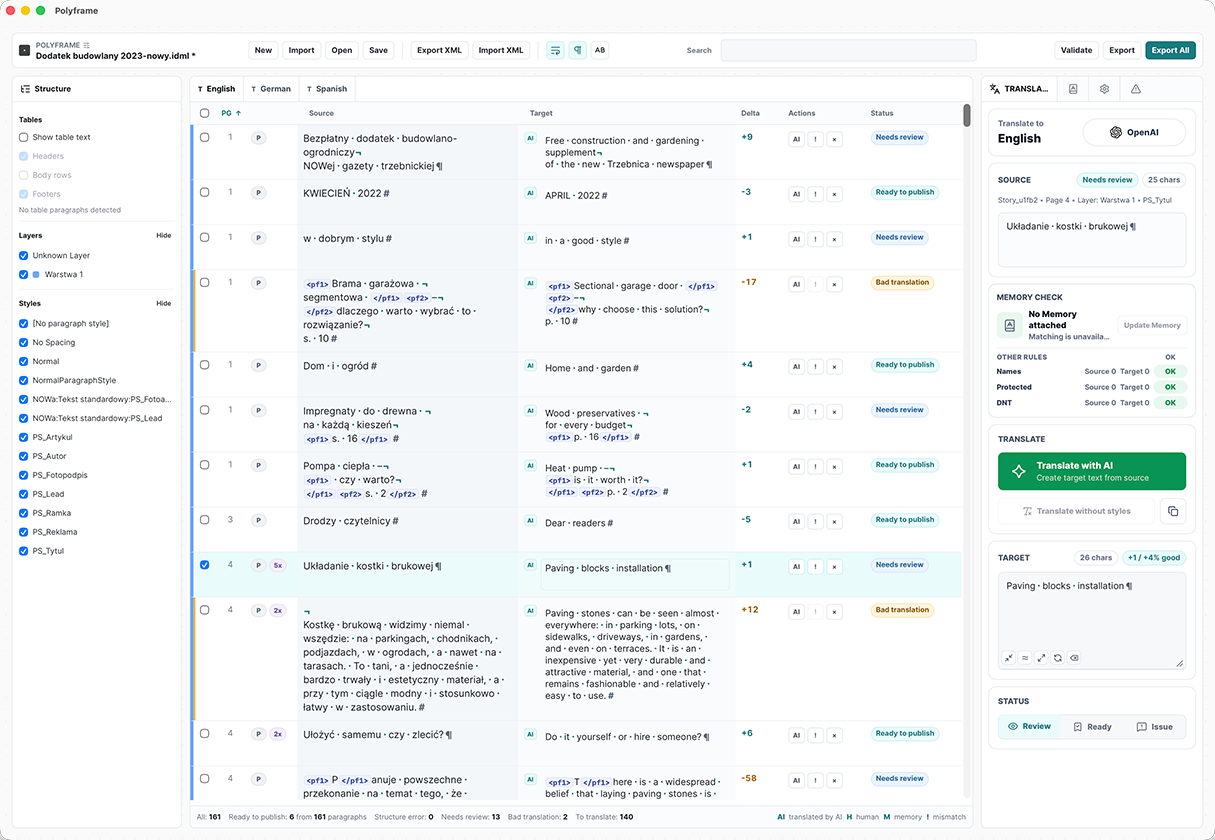
Upload one IDML file and generate versions for multiple target languages
Translate manually, using an AI subscription, your own API keys or an Excel-compatible file
Text stays connected to styles, tables and document structure, even in the most complex layouts
Projects stay local; online text is sent only when you choose it
The old way
Moving text through spreadsheets, email and InDesign creates repeated handoffs. Every correction must be pasted back, every language repeats the process, and Adobe access becomes a bottleneck.
WITHOUT POLYFRAME
WITH POLYFRAME
From IDML to translated IDML
Open an IDML supplied by the designer or agency. Polyframe keeps the original package as the base for every exported language version.
Translate and review text in a clean grid with document context, statuses and length guidance. No Adobe seat or page-layout training required.
Add and review target languages independently, then export a separate IDML for every finished version in one operation.
Write manually, use your preferred online or local AI, exchange text through an Excel-compatible file, or combine these methods.
Reuse approved segment pairs, names and fixed phrases. Brand, protected and do-not-translate rules keep important wording consistent.
Formatting markers, length signals and warnings reveal issues before export. The designer still performs the final layout and overflow check.
Pricing
Own Polyframe with a one-time App Licence and bring your own AI, or choose a monthly Polyframe™ AI plan with managed AI and included usage.
For designers & DTP partners
Give translators an IDML, receive complete language versions and focus your time on the final visual and overflow check.
Explore for designers →For translators & agencies
Translate and review complete documents without an Adobe seat, then return IDML files for the designer's final layout check.
Explore for translators →Polyframe Trial · macOS and Windows · 2026
Work directly on document segments instead of disconnected strings. Context, statuses and length guidance stay beside the text throughout translation and review.
Keep every target language in one project and export complete IDML versions together. Revisions stay connected instead of creating another spreadsheet handoff.
Receive translated IDML files with the original structure preserved. The designer can move straight to the final visual and overflow check instead of pasting every correction.
Workflow examples, not customer testimonials. Verified customer results will be added separately.
Watch a short walkthrough of the application before choosing the plan that fits your work.