
The layout kept by your designer or agency
The editable InDesign source remains with DTP. Polyframe does not open INDD files.
For small technical, product and documentation teams
Your team knows that one component name, model code or safety phrase must be used every single time. Polyframe keeps those decisions with the IDML. You do not need a localisation department or a large CAT platform to do it.
Local desktop projects · protected terms and memory · manual work, your own AI provider, Ollama or Polyframe AI
You probably know this kind of job
You are responsible for product documentation in a small manufacturer. A new machine series needs a German manual and a French parts catalogue before launch. The documents contain nearly 200 pages of component names, safety messages, torque values, tables and model symbols.
The first sample reads fluently. Then a service engineer notices that the same housing is translated three different ways on pages 24, 67 and 130. One model code has been treated as ordinary text, and a warning no longer matches the wording approved for the previous machine.
Your company has no localisation manager and no central CAT system. Approved terms are hiding in old PDFs, spreadsheets and email threads. The agency is waiting. The product team answers the same questions again and again. The launch date is not moving.
Three file names. That is all you need to know.
The agency can own the layout while your team owns the product language.
The editable InDesign source remains with DTP. Polyframe does not open INDD files.
The agency exports IDML from InDesign so the manual or catalogue text can be translated while its structure remains connected.
Product specialists can review names, numbers and approved language in the same project used for translation.
It runs on your computer
Install Polyframe on macOS or Windows. IDML files, languages, settings and translation memories live in local .polyframe projects. Manual translation and local Ollama can stay offline. This is useful when a manual simply should not be uploaded to another browser service.
When online AI is appropriate, connect your own provider, such as OpenAI, Claude or Gemini, or use Polyframe AI. Selected text is sent only when that online action is chosen. The product owner can still review every result and can complete the entire job without AI.
Manual when you want it. AI when it helps.
Polyframe lets the team choose how the text is translated while keeping the same terminology rules either way.
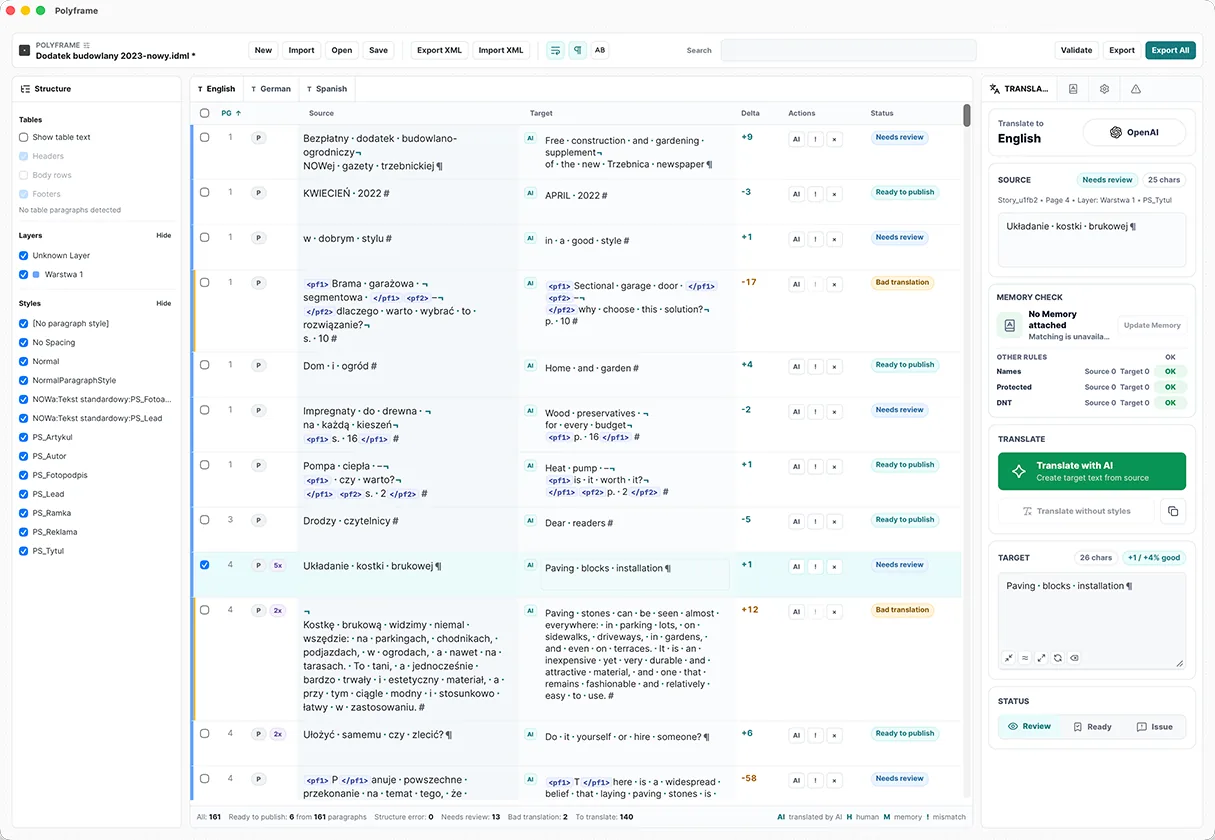
In our app, product specialists or translators can enter every target segment themselves and use statuses to show what still needs technical review.
Our translation app can attach a memory containing language already accepted in earlier manuals, catalogues or product sheets.
When AI is used, the Polyframe App can include a brief about the product, audience, tone and terminology instead of relying on a generic prompt.
Inside our translation app, connect your own AI provider, run local Ollama or choose Polyframe AI according to the document's confidentiality and the team's existing tools.
What actually happens to the file
Polyframe sits between DTP and technical review. There are only three things to settle: who owns the layout, who approves the terms and which file goes back to the agency.
01 · Agency
The original INDD stays with DTP. The technical team receives manual.idml or parts-catalogue.idml.
02 · Polyframe terms
In the app, add preferred translations for components and protect product names, model symbols and do-not-translate values.
03 · Polyframe translation
Use the app to reuse memory, apply the project brief and review every result that carries technical or safety meaning.
04 · Polyframe validation
Our app collects the relevant warnings so the team can resolve them before exporting the German or French IDML back to DTP.
05 · DTP
The designer checks tables, page breaks and text overflow, then creates the controlled output for release.
What Polyframe actually helps with
Polyframe is our small, focused InDesign companion app. It keeps the team's language decisions ready for the next manual without requiring a localisation department first.
The Polyframe App records the equivalent your engineers and service team actually use instead of accepting several plausible alternatives.
In our desktop app, you can keep brand names, product families, model codes and selected technical strings unchanged.
Our app for translating IDML reuses approved sentences in later editions and related documents, so the team does not search old PDF files again.
Polyframe, our InDesign companion app for IDML translation, lets you describe the machine, reader and language rules once, then includes that context in selected AI actions.
Polyframe checks inline tags, non-printing characters, statuses and length signals to identify segments that need attention before export.
The desktop app keeps German, French and later language versions beside one source instead of creating a disconnected process for each market.
What Polyframe is
A full CAT/TMS makes sense when a company continuously coordinates many products, vendors and software repositories. Polyframe does not replace that operation. It solves one clear problem: translate an InDesign IDML document, reuse the approved terminology and send a working file back to DTP.
For a small manufacturer, our app removes two bad choices: scattered spreadsheets or a platform built for a much larger company.
And this is how the job can end
The product team approves meaning, values and safety-critical wording. The designer handles tables, page breaks and the final PDF. Everyone keeps doing the job they actually know.
When the next model arrives, the Polyframe App can attach the protected names and approved component translations to the new project. The team reviews what changed instead of rebuilding its terminology from memory.
Start with the real document, not a sales call
The same desktop application supports manual work, your own AI providers and local Ollama at every stage.
01 · DOWNLOAD FIRST
No card, key or time limit. Use every feature and export complete IDML files with visible Trial markings.
02 · CLEAN EXPORT
Remove Trial markings from exported IDML while keeping manual translation, connections to your own AI provider and local Ollama.
Buy Polyframe™03 · OPTIONAL MANAGED AI
Add a monthly word allowance when you want ready-to-use AI inside the app without configuring a provider.
See AI plans →Plain answers before you download
No. The designer or agency exports an IDML. Product specialists work with its text in Polyframe while DTP keeps the original INDD and final layout responsibility.
Add them as protected or do-not-translate entries in Polyframe, then review the relevant warnings before exporting the target IDML.
Yes. Create or attach a Polyframe translation memory and use approved source-target pairs in later projects.
No. Every segment can be translated manually. If you want AI assistance, you can connect your own provider, such as OpenAI, Claude or Gemini, run local Ollama or choose Polyframe AI. Every result should still receive technical review.
Our desktop app stores projects, settings and reusable translation resources locally. Text leaves the computer only when an online translation option is deliberately used.
No. Software cannot replace responsible product or safety review. Polyframe helps keep terminology consistent and flags mechanical issues. Your specialists still approve the meaning.
Try it on a real IDML file
The full Polyframe Trial runs on macOS and Windows with no card, key or time limit. Trial IDML exports are visibly marked; a one-time App Licence unlocks clean export while manual work, your own AI providers and local Ollama remain available.